


Spotify: Music and Podcasts
4.31.86M Reviews
App Specs
- Version
- Varies with Device
- Updated On
- License
- Free
- Downloads
- 1,000,000,000+
- Developer
- Spotify AB
- Categories
- Music & Audio
- Platform
- Android, iOS
Screenshots
 Analysis by AppCompare
I use a music app differently depending on the day: sometimes I want one familiar album, and sometimes I want it to do the searching for me. Spotify: Music and Podcasts is built to handle both, with a large audio library and recommendations that can turn a quick listening session into a longer exploration. I find it most useful when I want music and podcasts in the same place, but it is worth thinking about how you listen before choosing it.
What matters when choosing an audio app
For me, the main questions are straightforward: can I find the audio I want, does the app help me discover more, and will it work for the way I listen when I’m away from home? Spotify is a free music and audio app from Spotify AB, rated Teen. Its average rating is 4.3, based on around 35 million ratings, and it has over one billion installs. Those figures point to a widely used service, but what matters day to day is whether its mix of search, playlists, podcasts, and paid features suits you.
The free starting point makes it easy to try without committing to a subscription. Paid plans are available through in-app purchases, with listed purchase amounts ranging from about six dollars to four hundred dollars per item. That range can cover different purchase options, so I would check the plan details shown in the app before deciding what to buy. The key practical distinction is that offline downloads and an ad-free experience are among the Premium perks described here, rather than something to assume comes with free listening.
Guides and Analysis on Spotify: Music and Podcasts
Endless Music and More
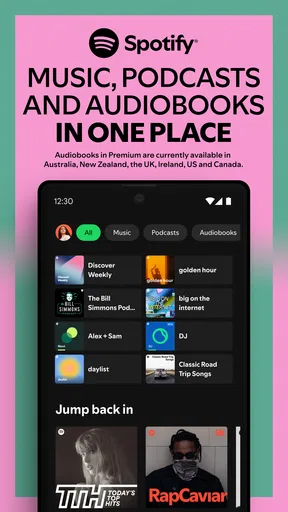
When you first open Spotify: Music and Podcasts, you're greeted with a slick, user-friendly interface. It's like a buffet of audio goodness just waiting for you to dig in. From the get-go, you can search for pretty much any song, artist, or album you can think of. Seriously, the music library is massive. Whether you're into the latest pop hits or some obscure indie band, Spotify's got you covered.
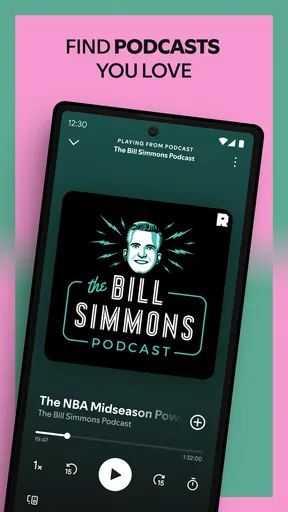
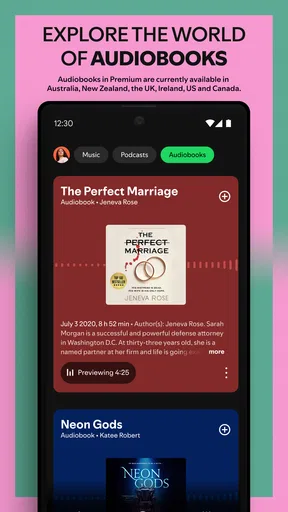
And it's not just about music. The podcast selection is equally impressive. Whether you're into true crime, comedy, or educational content, there's something for everyone. Spotify's algorithm also does a great job of suggesting new content based on your listening habits. It's like having a personal DJ in your pocket.
Playlists Galore
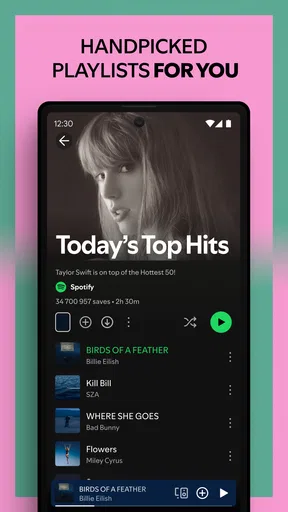
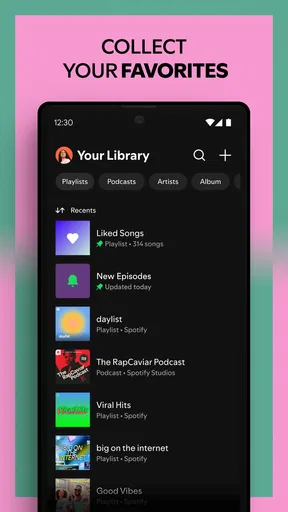
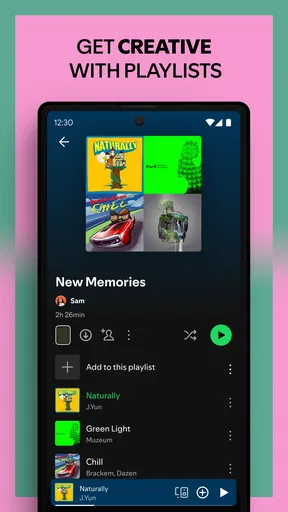
One of Spotify's standout features is its playlists. You can create your own personal playlists or choose from a plethora of curated ones. Feeling chill? There's a playlist for that. Need an energy boost? Yep, they've got you covered. The Discover Weekly playlist is a personal favorite of mine. Every week, Spotify curates a fresh list of tracks just for you, and it's surprisingly spot-on most of the time.
My practical tip is to treat recommendations as a starting point, not a verdict on your taste. When a suggested track fits the mood, save it to a playlist you can return to; when it misses, skip it and keep listening normally. Over time, that gives discovery a useful role without forcing you to hand over every listening choice to an algorithm. It also helps to make a few playlists for distinct situations rather than one enormous catch-all: a short commute mix, background music for focused work, or songs you want to share with friends.
Worth Reading Before You Choose

Baby Panda World Brings Quick Play to Modern Phones, but Its Game Library Feels Busy

ESPN’s Live Game View Makes Following Close Games Easier

QuizzLand Review: A Good Fit for Short Trivia Breaks, Not Every Player

Basketball Stars: Multiplayer Is Fast, but Can It Recover When Matches Go Wrong?

WEBTOON Turns Phone Updates Into a Better Reading Routine

Link to Windows Runs on Shared Habits, Not Social Feeds
Offline listening and what Premium changes
Now, let's talk about the premium subscription. While the free version of Spotify is great, upgrading to premium opens up a whole new world. No ads, unlimited skips, and the ability to download music for offline listening. Trust me, this is a game-changer, especially if you're always on the move or in areas with spotty internet. Plus, the sound quality is noticeably better with premium.
Offline listening is especially useful when a journey includes a train tunnel, a weak mobile signal, or limited connectivity. I’d make the download decision before leaving, while I have a reliable connection, rather than counting on a playlist to load at the last minute. It is also a good reason to keep a deliberately small travel selection: downloading everything you might possibly want can be less practical than choosing a few albums and playlists for that trip.
If you listen casually at home and don’t mind ads or having fewer skips, the free option may be enough. If you regularly want uninterrupted playback, prefer to choose each track, or need saved audio for travel, Premium’s advantages are easier to justify. The best choice depends less on how much music you like and more on whether those specific restrictions interrupt your routine.
Moving between devices and sharing music
Another cool feature is Spotify Connect, which lets you control your music across different devices. So if you're playing a song on your phone and want to switch to your smart speaker, it's as easy as pie.
That handoff is handy at home: I can start listening on my phone and move playback to a speaker without rebuilding the queue from scratch. It makes the app a stronger fit for someone who moves between personal listening and shared spaces. If you mostly use one device and rarely change where audio plays, Connect may not be a deciding factor, but it is a useful convenience when the situation comes up.
Social and collaborative features
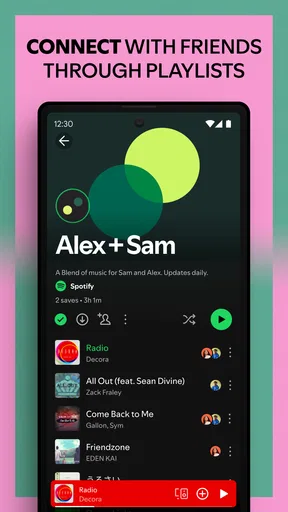
Spotify isn't just about solo listening. It's also a social platform. You can share playlists with friends, check out what they're listening to, and even collaborate on playlists together. It's a fun way to discover new music and bond over shared tastes.
Collaborative playlists work best when there is a real occasion behind them: friends adding songs for a road trip, or a group building a soundtrack for a get-together. The trade-off is that a shared list reflects everyone’s choices, so it may become less coherent than a playlist you curate alone. I’d use collaboration when the point is to include different tastes, and keep a personal version when I want a consistent mood.
There's also the option to follow your favorite artists and get updates on new releases and concerts. It's like being part of a global music community.
Where other listening options may suit you better
Spotify’s combination of music, podcasts, recommendations, playlists, and device handoff is its main strength. If you want one app for several kinds of listening, that breadth can be more convenient than switching between separate music and podcast services. It is also a natural fit for people who enjoy discovering unfamiliar tracks instead of only playing albums they already know.
Other approaches can make more sense, depending on your priorities. A service centered on a personal music collection may suit someone who wants to manage owned files rather than rely on streaming. A podcast-focused app can be preferable if podcasts are nearly all you listen to and you want an experience organized around that habit. And if you mainly want music without recommendations or social features, a simpler player may feel less busy. I would choose Spotify for its mix and discovery, not because every listener needs every part of it.
Switching is easiest if you are willing to rebuild your listening habits gradually. Start by making a few essential playlists and following the artists or shows you return to most; then use recommendations to fill in the gaps. The less convenient part is that a familiar library of saved favorites and carefully arranged playlists takes time to recreate in any new service. If those collections matter to you, try Spotify alongside your current app first, rather than abandoning a setup you rely on before you know the new one fits.
My recommendation
So, is Spotify: Music and Podcasts worth your time? Absolutely. It's more than just a music app; it's a comprehensive audio experience. With its vast library, personalized recommendations, and social features, it's no wonder Spotify remains a top choice for music and podcast lovers alike.
If you haven't tried it yet, what are you waiting for? Whether you're a casual listener or a hardcore music enthusiast, Spotify's got something for you. Just be prepared to fall down a rabbit hole of endless audio adventures.
I’d recommend starting with the free experience and judging it by a normal week, not a one-off browsing session. Notice whether you return to the recommendations, whether podcasts belong in the same listening routine as music, and whether ads or playback limits bother you. If those limits are a real annoyance, consider Premium; if not, there is no need to pay simply because the option exists.
For my everyday use, the clearest win is having a single place to move between familiar favorites and new finds, then carry a playlist into a commute or share it with friends. The clearest reason to skip it is if you want a narrowly focused tool, dislike algorithm-led discovery, or have no interest in streaming and its subscription trade-offs. For listeners who want music and podcasts together with room to explore, Spotify is an easy app to try; just choose the listening setup that matches your habits rather than assuming one plan fits everyone.
Pros
- Vast library of songs and podcasts.
- User-friendly interface and design.
- Personalized playlists and recommendations.
- Offline listening available with Premium.
- Cross-platform syncing and compatibility.
Cons
- Free version has frequent ads.
- Some features locked behind Premium.
- Quality varies depending on connection.
- Limited skips with free version.
- Not all songs available in every region.
FAQs for Spotify: Music and Podcasts
What features does Spotify offer for free users?
Spotify provides free users with access to a vast library of music, playlists, and podcasts. However, free users may experience ads between songs, limited skips, and lower sound quality. Offline listening and some playlist features are restricted to premium users only. Despite these limitations, the free version offers a comprehensive listening experience.
How does Spotify’s Premium subscription enhance the user experience?
Spotify Premium removes ads, allowing for uninterrupted listening. It also offers higher sound quality and the ability to download songs for offline listening. Premium users can skip songs without restrictions and create playlists with more flexibility. These features provide a more seamless and customizable listening experience.
Is Spotify available on all devices?
Yes, Spotify is widely available on various devices. It can be accessed through apps on Android and iOS devices, desktops via the web player or dedicated apps, and even on smart speakers and TVs. This cross-platform availability ensures users can enjoy music and podcasts anywhere, anytime.
How does Spotify’s playlist and discovery feature work?
Spotify offers personalized playlists like Discover Weekly and Daily Mixes, which are curated based on your listening habits. The app uses algorithms to suggest new music and podcasts, helping users discover new content. Users can also explore curated playlists across different genres and moods, enhancing music discovery.
What should I consider about Spotify’s data usage?
Streaming music and podcasts on Spotify can consume a significant amount of data, especially at higher sound quality settings. To manage data usage, users can download content for offline listening on Wi-Fi or adjust streaming quality to lower levels. Understanding these settings helps in effectively managing mobile data consumption.


